Templates
Ready-made workflows for the jobs most tenants need — catalogue import, orders export, sales digest. A template is a starting point you adapt, not a product you configure.
Where you find it
Integration Studio › Extend and Develop › Templates —
/integrations/templates.
Fields and controls
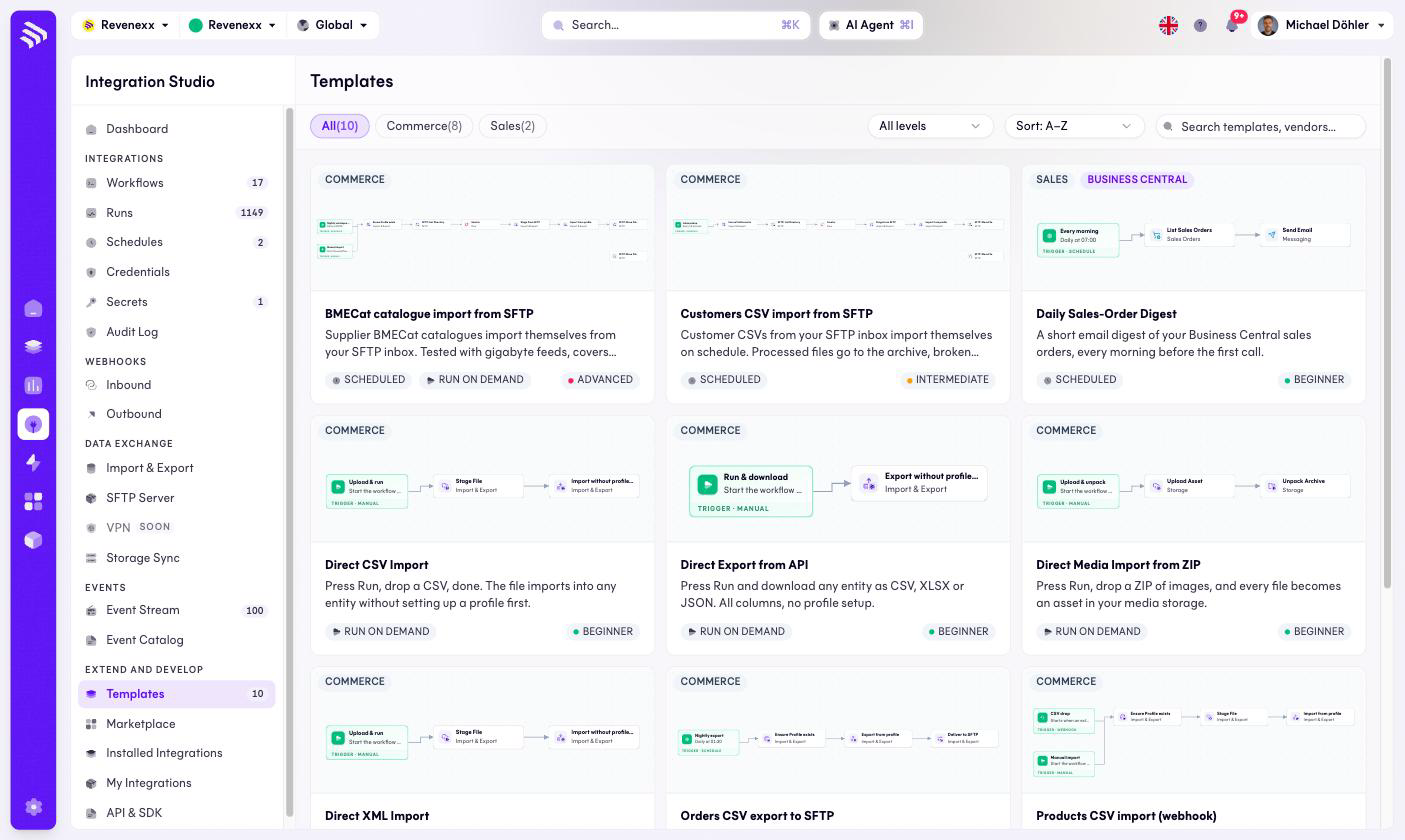
Each card shows a mini preview of the workflow graph, a category tag
(COMMERCE, SALES, BUSINESS CENTRAL), trigger badges (SCHEDULED,
RUN ON DEMAND) and a difficulty level (BEGINNER, INTERMEDIATE,
ADVANCED). Category chips, a level select, sorting and search filter the
catalog.
The catalog currently holds ten templates, among them BMECat catalogue import from SFTP, Customers CSV import from SFTP, Daily Sales-Order Digest, Orders CSV export to SFTP and Products CSV import via webhook.
What happens when you change it
Clicking a card opens the template to use it — the result is a normal workflow in Workflows, yours to edit. The template itself stays untouched.
Permissions
Not verified.
Related
- Workflows
- Guide: Build a workflow