Workflows
Runs
Every workflow execution: status, trigger, duration — and the Missed runs tab.
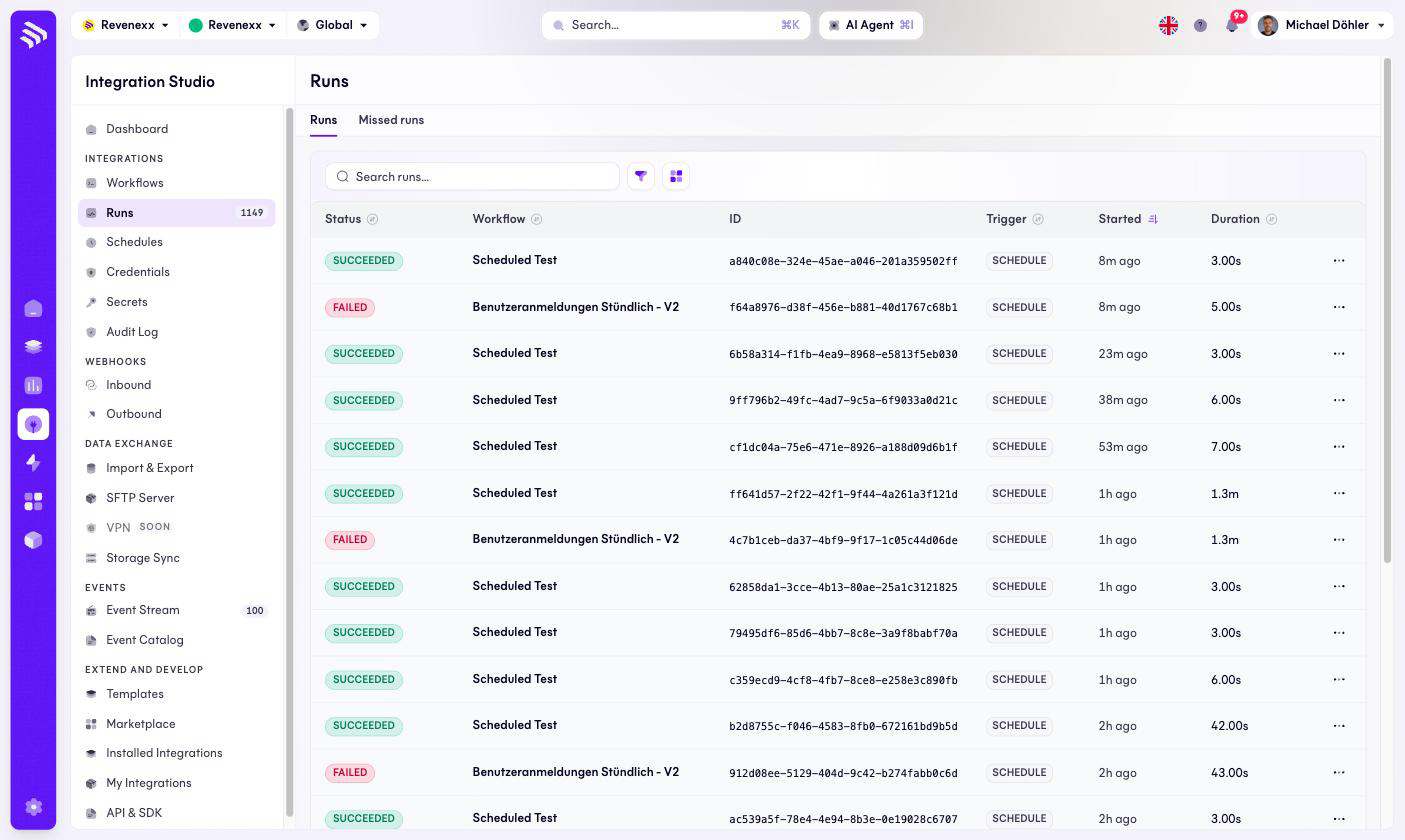
A run is one execution of a workflow. This is the screen you open when someone says the stock figures are stale: a workflow that never started and a workflow that ran and failed are different problems, and this list tells them apart.
Where you find it
Integration Studio › Integrations › Runs — /integrations/runs. Two
tabs: Runs and Missed runs. The same history appears per workflow on
the editor's Runs tab.
Fields and controls
| Column | What it shows |
|---|---|
| Status | SUCCEEDED or FAILED. |
| Workflow | Which workflow executed. |
| ID | The run's unique ID — the reference you paste into a support ticket. |
| Trigger | What started it: SCHEDULE, MANUAL, and the other trigger types. |
| Started | When. |
| Duration | How long it took. |
A row click opens the run's execution log; search, a filter and the view switch narrow the list. Missed runs lists scheduled executions that did not fire — the tab to check when a nightly import silently stopped.
What happens when you change it
Runs are history — nothing here edits them. The per-row … menu carries the run-level actions.
Permissions
Not verified.