Credentials
A credential holds how to reach one external system — the ERP's host and user, an API token, an SFTP login. Workflows reference credentials instead of containing them, which is what lets you swap a test ERP for production without editing a single node.
Where you find it
Integration Studio › Integrations › Credentials —
/integrations/credentials.
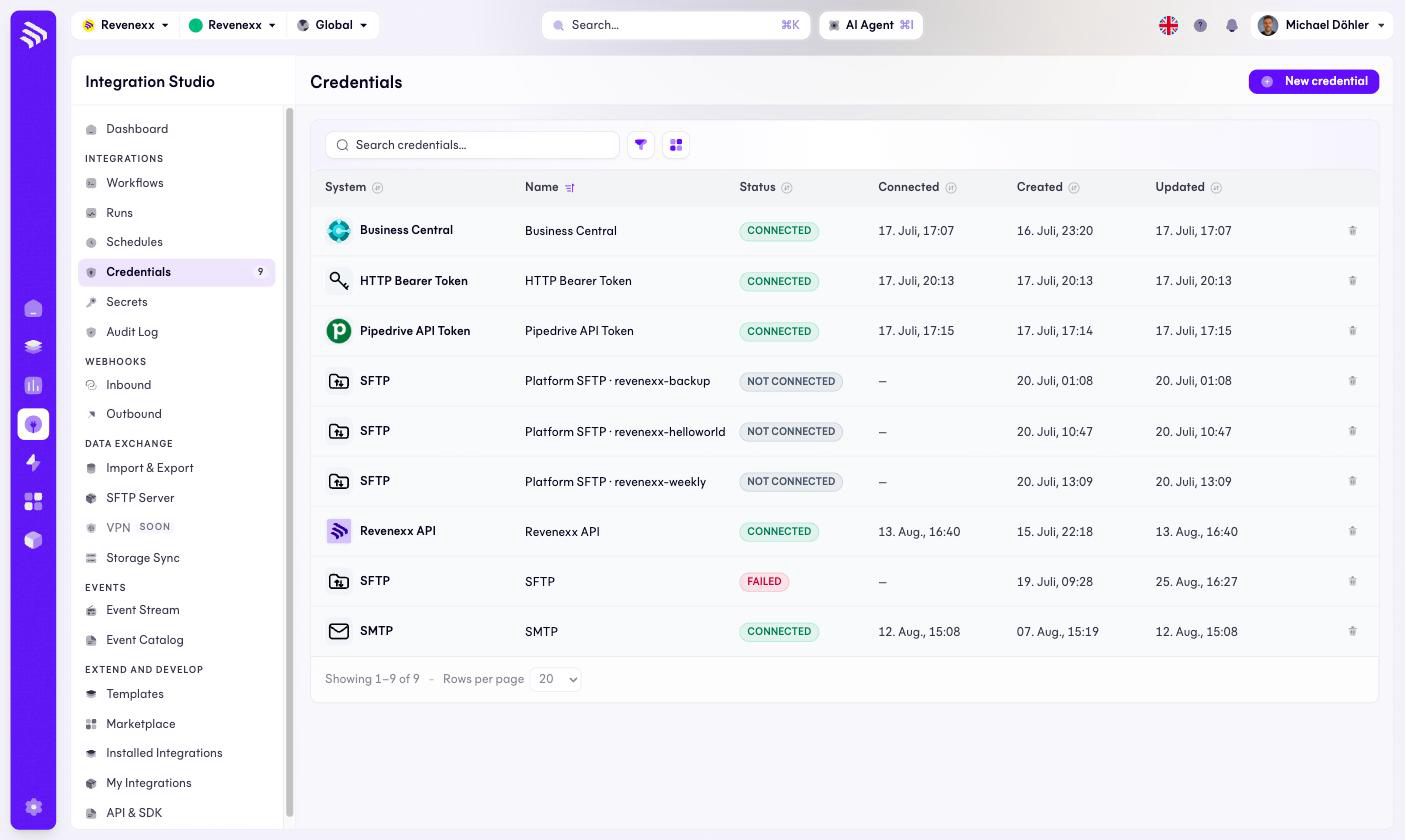
Fields and controls
| Column | What it shows |
|---|---|
| System | Icon and name of the system type — Business Central, SFTP, SMTP, HTTP Bearer Token, and the others. |
| Name | Your name for this credential, for example revenexx-backup. |
| Status | CONNECTED, NOT CONNECTED or FAILED. |
| Connected | When the connection last verified. |
| Created / Updated | Lifecycle timestamps. |
New credential creates one; each row has a delete icon. The screen never displays a stored value — status is all you get, by design.
Accounts created on the SFTP Server screen appear here automatically as Platform SFTP credentials.
What happens when you change it
A credential on FAILED breaks every workflow that references it, usually as
a run failing at the first node that touches the system. Fix the credential
once and the workflows recover on their next run — that is the point of
keeping the connection out of the workflow. Deleting a credential that
workflows still reference has the same blast radius as a failed one.
Permissions
Not verified.
Related
- Secrets — single values rather than whole connections.
- Guide: Connect a system