Edit a product
The product editor is where enrichment happens. Detail and edit are the same screen: an inline form with a Save button that stays disabled until you change something.
Where you find it
Commerce Studio › PIM › Products › SKU — click a SKU or the row's Edit action in the product list.
What it does
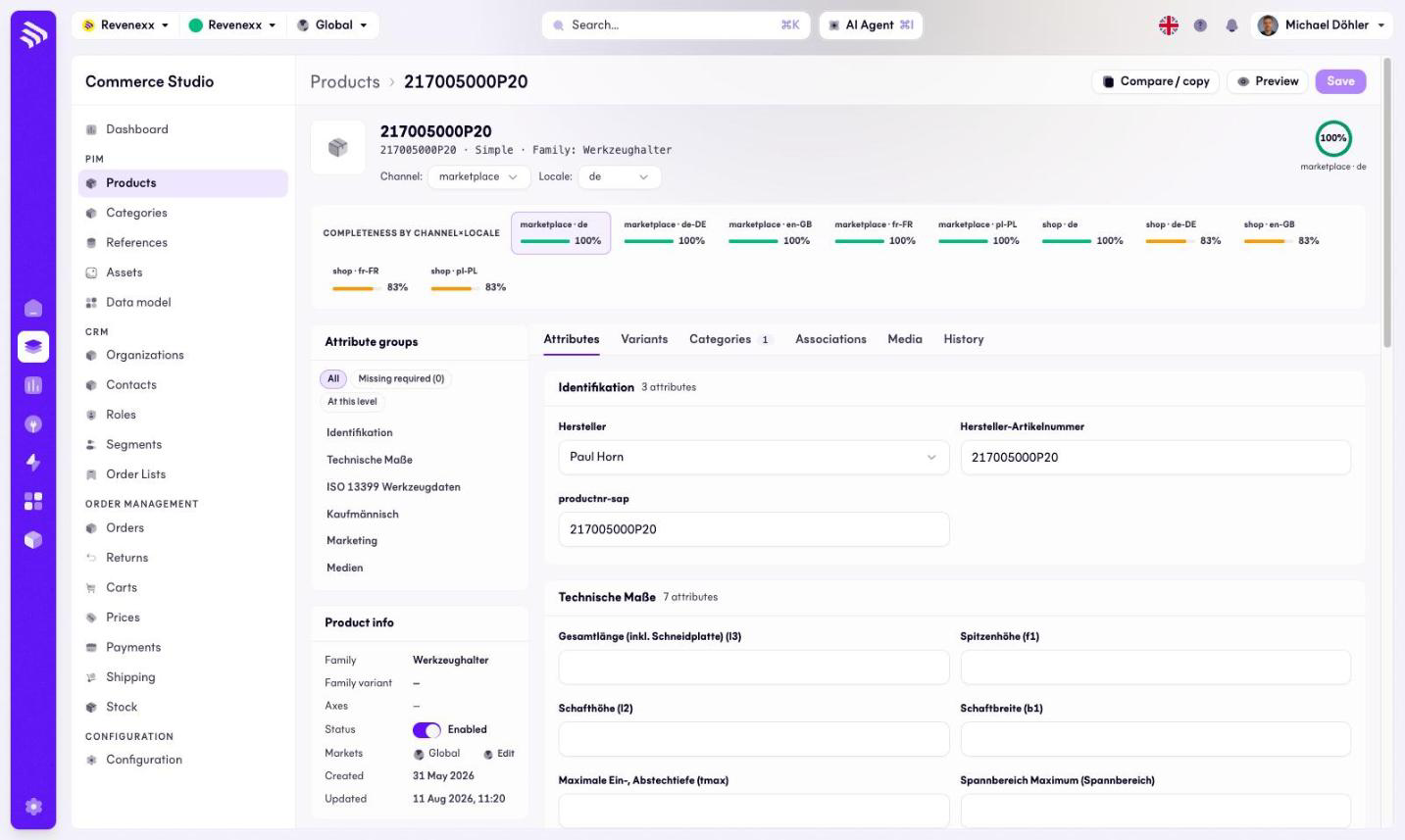
The header shows the SKU, the kind and the family. Directly under it, a completeness strip shows one percentage bar per channel and locale combination (for example marketplace × de-DE, shop × en-GB), so you see at a glance where enrichment stands for each sales context.
Two selectors in the toolbar — channel and locale — decide which context you are editing. A value can differ per channel and per locale; the strip is the map, the selectors are the cursor.
A Product info panel summarises family, family variant, axes, status, markets and the created/updated timestamps. The markets assignment has its own Edit control.
Fields and controls
The toolbar carries a compare/copy control, a Preview, and Save (disabled until a change is made).
On the Attributes tab, a side panel filters the form: all attributes, missing required ones, or only the attributes set on this level. Below it, the attribute groups (for example Identification, Technical measures, Commercial, Marketing, Media) render as form sections in the order the attribute groups define.
Tabs
| Tab | What it holds |
|---|---|
| Attributes | The enrichment form, grouped by attribute group. The default tab. |
| Variants | The variant products of a model. |
| Categories | The category memberships, with a count badge on the tab. |
| Associations | Cross-sell, up-sell, spare-part and accessory links to other products. |
| Media | The product's assets, with an add-media control. |
| History | The change log of the record. |
What happens when you change it
Nothing is written until you press Save. Changing a value in a channel or locale context writes it for that context only; the completeness strip recalculates per context. Assigning markets in the Product info panel scopes the product's visibility.
Permissions
The products app declares create, read, update and delete on products in its manifest. Which Cockpit roles may open this screen is not verified.