Mail is your tenant's transactional mail service — the order confirmations, password resets and form notifications your platform sends — with the operational view an email service needs: what went out, what bounced, and what is still waiting.
Where you find it
Settings › Services › Mail — /settings/mail.
What it does
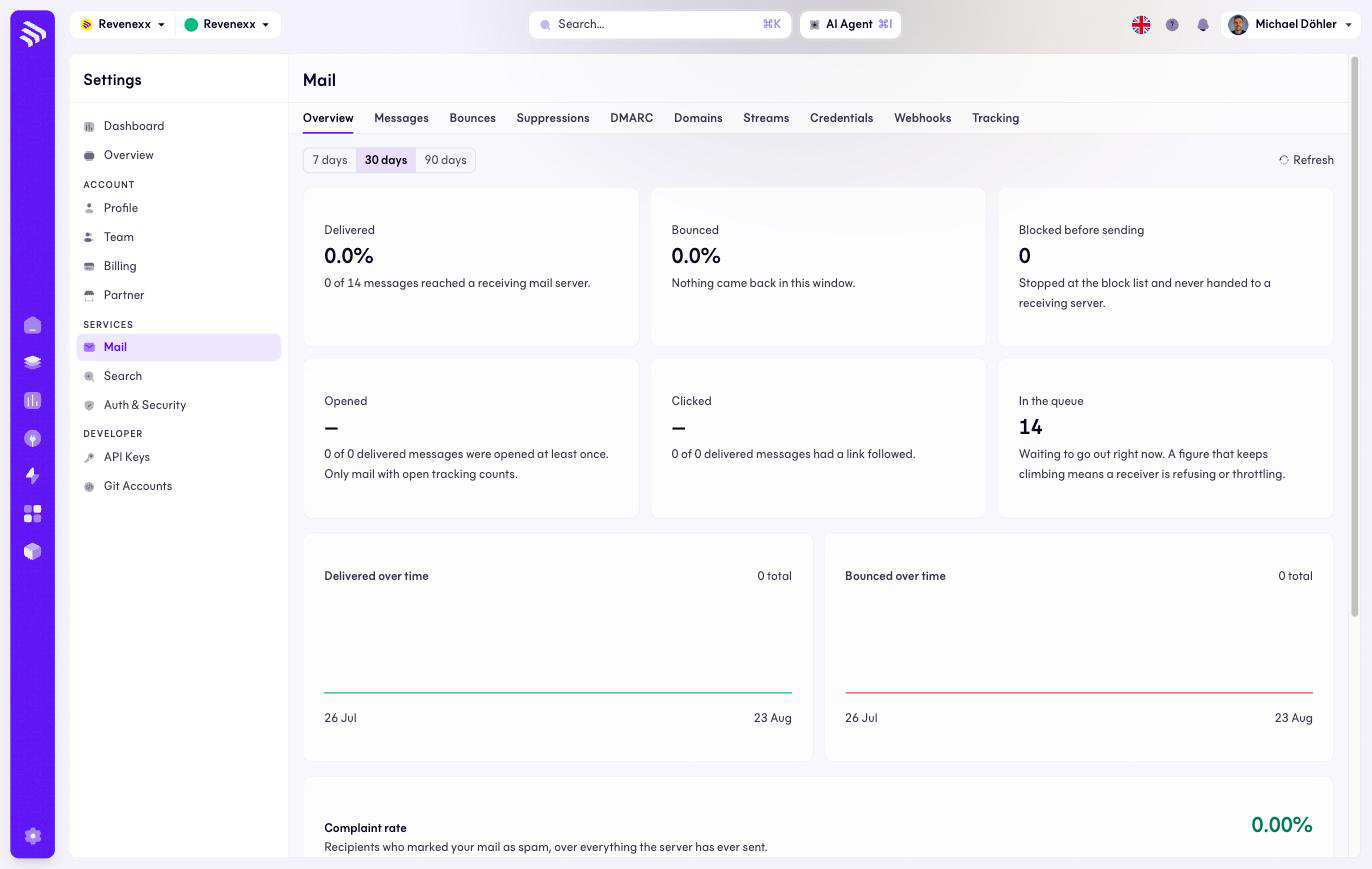
The Overview tab shows delivery KPIs for a selectable range (7, 30 or 90 days): Delivered and Undeliverable as percentages, messages blocked before sending, opened and clicked rates, and how many messages are in the queue.
Nine further tabs cover the rest of the service: Messages, Bounces, Blocklist, DMARC, Domains, Streams, Credentials, Webhooks and Tracking. This page documents the Overview; the other tabs are not documented yet.
Fields and controls
| Control | What it does |
|---|---|
| Range switch (7 / 30 / 90 days) | Scopes the KPIs. |
| Refresh | Reloads the counters. |
| Tabs | Open the message log, bounce list, blocklist, DMARC reports, sending domains, streams, credentials, webhooks and tracking settings. |
What happens when you change it
The Overview itself is read-only; changes happen in the individual tabs.
Permissions
Which Cockpit roles may open Mail or change its configuration is not verified.
Related
- Guide: Forms and email
- Guide: Notifications