Team
The Team list answers the question every audit starts with: who can open your Cockpit right now?
Where you find it
Settings › Account › Team — /settings/team.
What it does
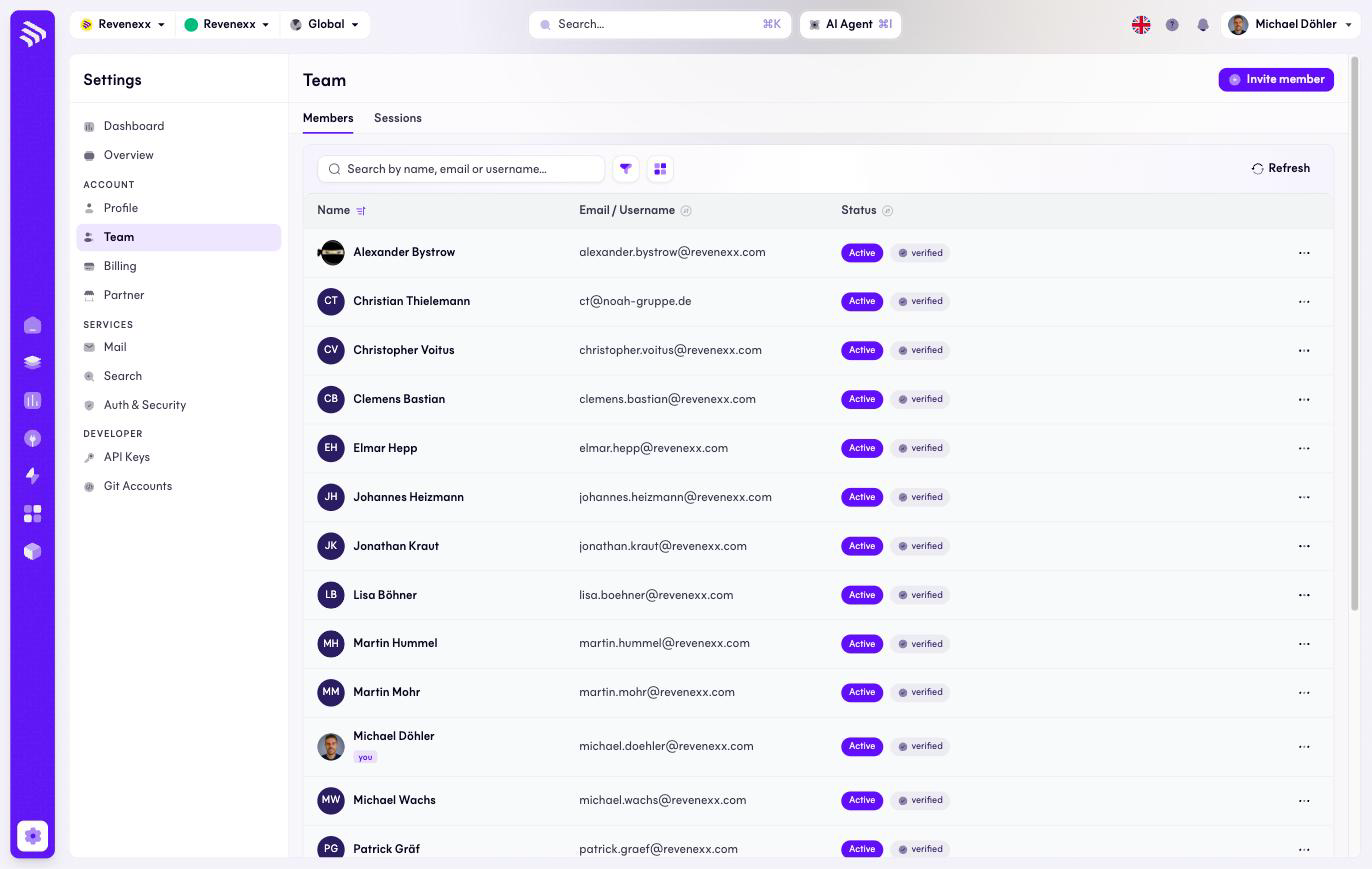
Two tabs: Members and Sessions. The member list shows one row per person with Cockpit access; your own row carries a You badge. Invite member adds someone by email.
The list shows no role column — membership and status are what you manage here. Which data a person may touch is governed elsewhere; the Users and roles guide explains the model.
Fields and controls
| Column / control | What it shows or does |
|---|---|
| Name | Avatar and name; You on your own row. |
| Email / username | The account's login identity. |
| Status | Active, with a verified badge once the account is confirmed. |
| Row menu (…) | Per-member actions. |
| Invite member | Sends an invitation. |
| Search | Filters by name, email or username. |
| Refresh, filter, view switch | Standard list controls. |
What happens when you change it
An invited person appears in the list and gains Cockpit access once they accept and verify. Removing access is a per-member action — review this list when someone leaves the company, the same way you would revoke their ERP login.
Permissions
Which Cockpit roles may invite or remove members is not verified.
Related
- Guide: Invite your team
- Guide: Users and roles
- Guide: Single sign-on