Families
A family is a product type: it decides which attributes a product carries and which of them serve as its name and its image. Every drilling tool shares the drilling-tool attribute set because both belong to the same family.
Where you find it
Commerce Studio › PIM › Data model › Families — the default tab of
/commerce/data-model.
What it does
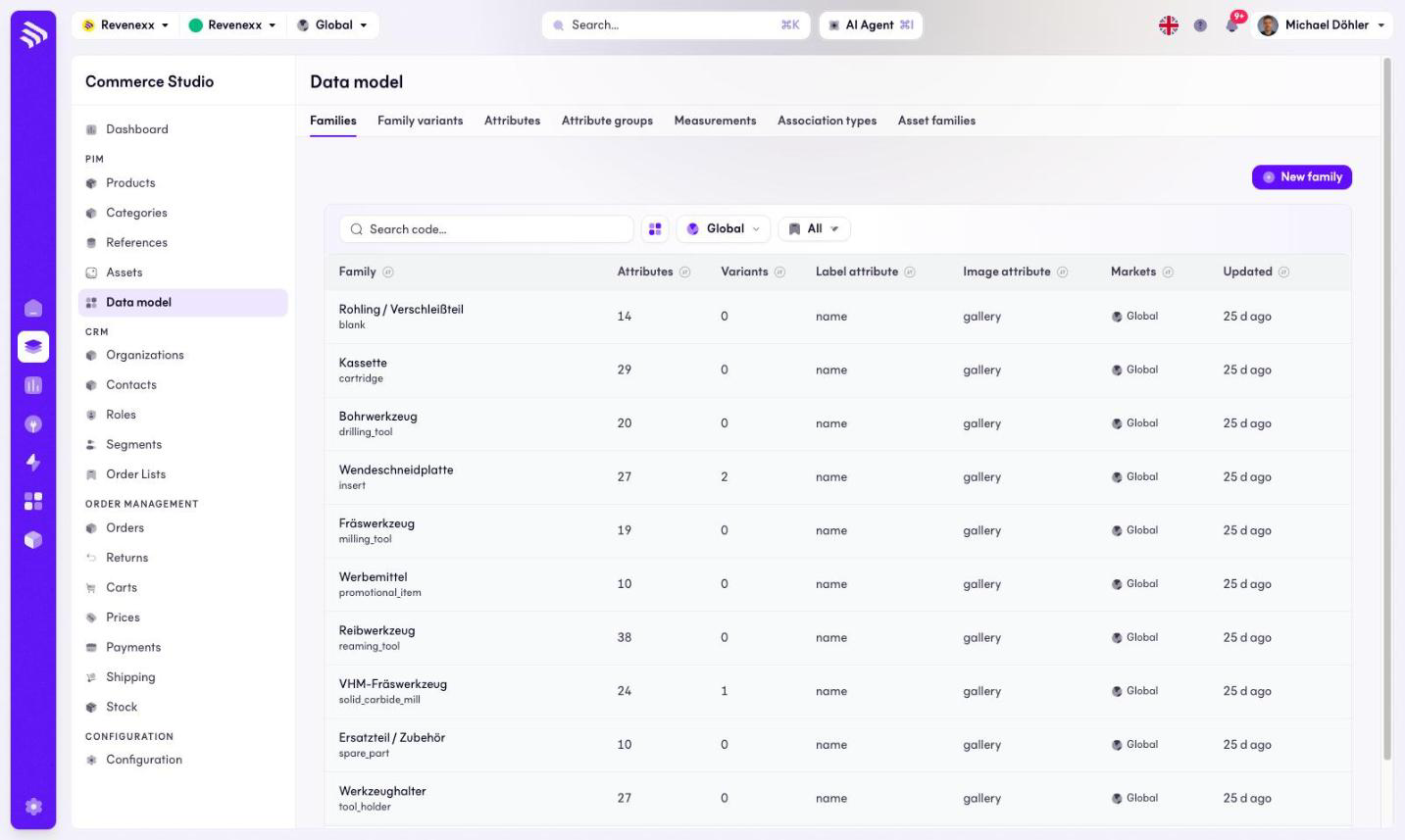
The tab lists the families — for example insert, milling_tool,
spare_part — with the size of their attribute set and their display
attributes. New family creates one; a search box finds one by code.
Fields and controls
| Column | What it shows |
|---|---|
| Family | Name and code. |
| Attributes | How many attributes the family carries. |
| Variants | How many family variants are defined on it. |
| Label attribute | Which attribute is the product's display name. |
| Image attribute | Which attribute is the product's image. |
| Markets | Market assignment. |
| Updated | Last change. |
What happens when you change it
A new family starts empty; products assigned to it get its attribute set as their enrichment form. The label attribute decides what a product of this family is called everywhere the Cockpit shows a name.
Permissions
The products app declares create, read, update and delete on families in its manifest. Which Cockpit roles may open this screen is not verified.
Related
- Guide: Families
- Family variants